
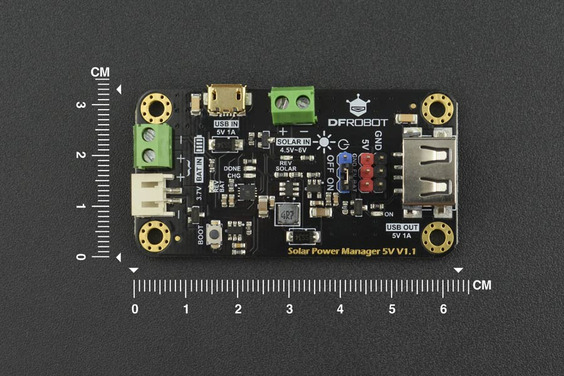
DFRobot 5V Solar Power Manager

Ask Our AI Assistant

Product Image
Working Principle

Description

The DFRobot 5V Solar Power Manager utilizes a constant voltage MPPT algorithm to maximize the efficiency of the connected 5V solar panel. It features an MPPT function that tracks the maximum power point of the solar panel, ensuring optimal power conversion.

Sensor Types

5V solar panel

Dos And Donts

Donts

  • Exceed The Specified Input Voltage Range (4.5~6v): Avoid connecting solar panels with input voltages outside the recommended range to prevent damage.

Dos

  • Use With 5v Solar Panels For Optimal Performance: Ensure to connect the DFRobot 5V Solar Power Manager with a 5V solar panel to achieve maximum efficiency.
Limits

Operating Temperature

  • Min: -40°C,
  • Max: 85°C
How To Connect

Solar Panel Connection

  • Positive Terminal: Connect to the positive terminal of the 5V solar panel,
  • Negative Terminal: Connect to the negative terminal of the 5V solar panel
Dimensions

Length (Mm)

63

Width (Mm)

33